Night Shifts & Extended Days
How AllWage handles shifts that run across midnight — extended days and night-shift breaks around midnight.
This section explains how AllWage handles shifts that cross from one calendar day into the next — for example a night shift that starts in the evening and ends the following morning. If you run night shifts, this is how the system keeps each shift's hours together on a single day.
How the day boundary works
In AllWage, each day runs from midnight to midnight. Every clock-in and clock-out belongs to the calendar day it physically happened on.
We keep the day boundary fixed at midnight on purpose. A simple, predictable day makes it easy to spot problems — a missing clock-in, a forgotten clock-out, or a shift that doesn't look right. If the boundary moved around from one employee to the next, those exceptions would be much harder to see and trust.
Why don't we shift the day for night-shift workers?
In the past, some systems tried to handle night shifts by moving the start of the day earlier (for example, starting the "day" at 18:00 so a night shift fell inside one block). This created more problems than it solved: it made reports inconsistent between day and night workers, broke as soon as someone's hours fell outside the assumed window, and made missing clocks very hard to detect.
Instead, AllWage keeps the day fixed at midnight for everyone and handles night shifts with the two mechanisms below — extended days and continuous night shifts across breaks. This keeps reporting consistent for every employee while still counting each night shift correctly.
Extended days
A fixed midnight boundary raises one obvious question: what about a shift that is still in progress when midnight passes?
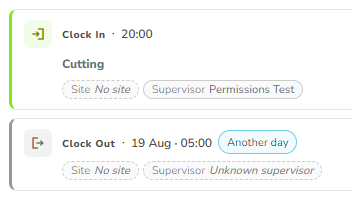
When an employee clocks in before midnight and works straight through into the next morning, AllWage automatically keeps the whole stretch together as one shift on the day it started. This is called an extended day.
For example, an employee clocks in at 18:00 and clocks out at 05:00 the next morning. Rather than showing this as a missing clock-out on the first day and a stray clock-out on the second, the system recognises it as one continuous shift and calculates the total hours across the two calendar days.
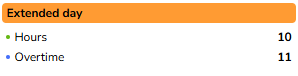
Extended days are flagged on both the Employee Overview report and the Time & Attendance dashboard so you can easily see which shifts crossed midnight. On the dashboard, the clock-out time is annotated with a (+1) to show it happened on the next day.
An extended day is applied automatically when:
The employee's last action on the day is a clock-in (there is no clock-out yet on that day), and
The next day starts with a clock-out, and
The time between that clock-in and clock-out is within the maximum shift length of 27 hours (so an employee is never credited with an impossibly long single shift).
Night-shift breaks around midnight
Extended days handle a shift worked straight through midnight. But night-shift employees often take a break around midnight — a meal break or a short rest — and clock out and back in while doing so.
AllWage treats a short break around midnight as part of the same shift, not the end of one shift and the start of another. As long as the employee clocks back in within a short window of clocking out, the system keeps the whole night as one continuous shift on the day it started, with the break excluded from worked hours.
This applies to both common patterns:
A break taken after midnight — the employee works past midnight, then clocks out for a break in the early hours and clocks back in shortly after.
A break straddling midnight — the employee clocks out before midnight and clocks back in after midnight. This is common for teams working to an overseas time zone, where the meal break naturally falls right around 00:00.
If there are several short breaks around midnight, each one is treated the same way, so the shift stays together as a single day rather than being chopped into pieces.
Worked example
A night shift runs from 22:00 to 06:00, and the employee takes a 30-minute break at 01:00:
Clock in
22:00
Day 1
Clock out (break)
01:00
Day 2
Clock in (resume)
01:30
Day 2
Clock out (end)
06:00
Day 2
AllWage records this as one shift on Day 1: 22:00 → 06:00, with a 30-minute break in the middle. The break time is not counted, so the worked hours are 7h30m.
The break time between clocking out and clocking back in is unpaid and is not included in the worked hours — only the time actually clocked in counts.
When does a new shift start instead?
The system needs to tell the difference between a break (same shift continues) and the end of a shift (a genuinely new shift later on).
The rule of thumb is the length of the gap. A real break is almost never longer than about two hours, so:
If the employee clocks back in within roughly two hours of clocking out, it's treated as a break and the shift continues.
If the gap is longer than that, the shift has ended. The later clocks start a new, separate day — exactly as they do today.
There is also a sensible upper limit on how long a single shift can run: 27 hours from the first clock-in. A long chain of short breaks can never stretch one "shift" on indefinitely — once a shift reaches 27 hours, any further clocks start a new day.
The two-hour guideline comfortably covers normal break patterns. If your operation has unusual break arrangements around midnight, contact AllWage support so we can advise on the best clock template setup.
Where you'll see this
Employee Overview report — shifts that cross midnight show an Extended Day indicator next to the day's hours. Open the timeline details (the three dots) to see the full shift, including any break around midnight.

Time & Attendance dashboard — extended days are flagged, with a (+1) on the clock-out that lands on the next day.


Last updated
Was this helpful?