> For the complete documentation index, see [llms.txt](https://help.allwage.com/llms.txt). Markdown versions of documentation pages are available by appending `.md` to page URLs; this page is available as [Markdown](https://help.allwage.com/modules/councils/enabling-a-council.md).
# Enabling a Council for a Company
Turn on a bargaining council for your company and capture the registration details that council requires.
Before you can enrol employees or generate submissions, you need to enable the council for your company and capture your company's details with that council. This is a once-off setup per company, updated only when your council details change.
## Where to set it up
Council setup lives with your company's other payroll details.
1. Navigate to [Payroll / Settings / Companies](https://app.allwage.com/#/payroll/settings/details/list).
2. Open the company you want to set up.
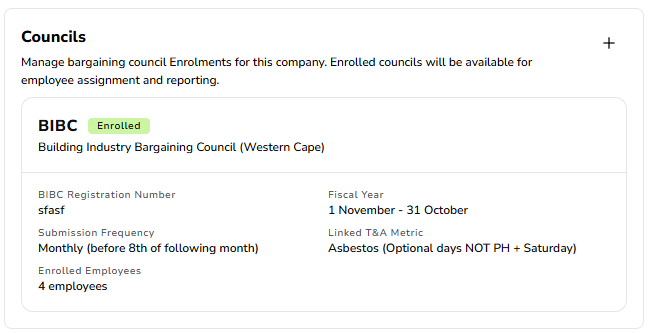
3. Find the **Councils** section and add the council your company belongs to.
{% hint style="info" %}
A company can be enrolled in more than one council. Each council is set up separately with its own details.
{% endhint %}
## What you'll capture
Each council asks for its own set of company-level details. In general, this includes:
* **Your company's registration or firm number** with the council — this identifies your business to the council.
* **The shift source** — for councils that count shifts, you choose which time & attendance measure represents that council's shifts for your company (for example, an existing measure that already counts qualifying shifts).
* **Any council-specific banking details**, where the council requires payments to a specific account.
The exact fields differ by council. See the council's own page for the detail:
* [BIBC company setup](/modules/councils/bibc.md)
## Company details used across councils
Some details belong to your company as a legal entity — not to a single council — and are captured once on your company record, then reused by every council that needs them. These include your trading name, address, contact person and banking details.
If a council submission needs one of these and it hasn't been captured yet, you'll be prompted to add it on the company record. For where these live, see [Employer Information](/modules/payroll/employer-information.md).
## After enabling a council
Once a council is enabled for your company:
* The council becomes available when [enrolling employees](/modules/councils/enrolling-employees.md).
* The council's submissions become available in [Council Reports & Submissions](/modules/councils/reports-and-submissions.md).
Councils your company is **not** enrolled in never appear on employee profiles or in the reports area, keeping the screens clean and relevant to your business.
---
# Agent Instructions
This documentation is published with GitBook. GitBook is the documentation platform designed so that both humans and AI agents can read, navigate, and reason over technical content effectively. Learn more at gitbook.com.
## Querying This Documentation
If you need additional information that is not directly available in this page, you can query the documentation by asking a question.
Perform an HTTP GET request on the following URL with the `ask` and `goal` query parameters:
```
GET https://help.allwage.com/modules/councils/enabling-a-council.md?ask=&goal=
```
`ask` is the immediate question: it should be specific, self-contained, and written in natural language.
`goal` is what the user is ultimately trying to achieve, the reason they need the answer. Sharing it helps GitBook give you a better, more relevant answer. A goal is most helpful when it describes the outcome the user wants rather than restating the question. For example, with `ask=how do I create an API token`, a goal like `automate deployments from our CI pipeline` lets GitBook tailor the answer to that use case.
The response will contain a direct answer to the question and relevant excerpts and sources from the documentation.
Use this mechanism when the answer is not explicitly present in the current page, you need clarification or additional context, or you want to retrieve related documentation sections.